QUICK START: SUNO AUTOMATION IN 5 MINUTES

01

INSTALL_EXTENSION

Install SongSmith AI from the Chrome Web Store. Get a free OpenRouter API key for AI concept generation.

02

CONFIGURE_SETTINGS

Open extension settings, paste your API key. Optionally customize your lyrics style, music preferences, and art prompt instructions.

03

GO_TO_SUNO

Visit suno.com and look for the SongSmith sidebar panel on the right side of the screen.

04

GENERATE_CONCEPT

Enter any topic (e.g., "summer road trip") and click Generate. AI creates complete song concept with lyrics, style, and prompts.

05

FILL_SUNO_FORM

Click "Fill Suno Form" to automatically populate Suno's creation interface. Click Create on Suno to generate your song!

SUNO AUTOMATION WORKFLOWS

[WORKFLOW 1] SINGLE SONG GENERATION

Perfect for quick song creation. The Suno automation panel provides everything you need:

  • Topic Input: Describe your song idea in a few words
  • AI Generation: Get complete lyrics with verses, chorus, and structure tags
  • Music Style: Receive genre-appropriate style suggestions
  • Art Prompt: Get cover art ideas for your song
  • YouTube Description: Auto-generated description for uploads
  • One-Click Fill: Instantly populate Suno's form
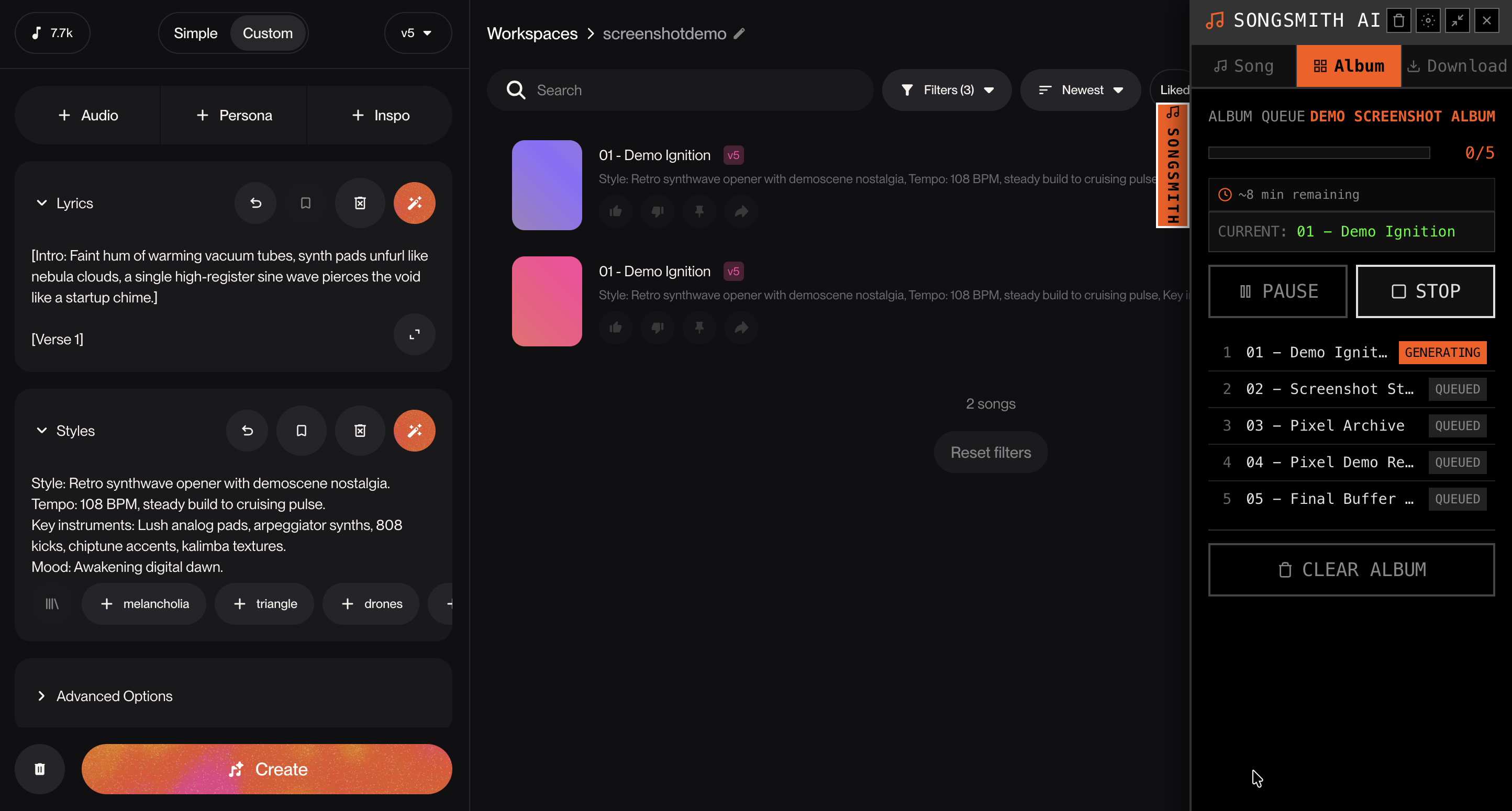
SongSmith sidebar panel generating songs on Suno

The sidebar panel integrates directly with Suno's interface

> PRO TIP: Use the Regenerate buttons to refine individual sections without regenerating everything.
[WORKFLOW 2] SUNO BATCH GENERATION - FULL ALBUMS

The real power of Suno mass song generation - create entire albums automatically:

  1. Open Task Manager: Go to extension settings > Task Manager tab
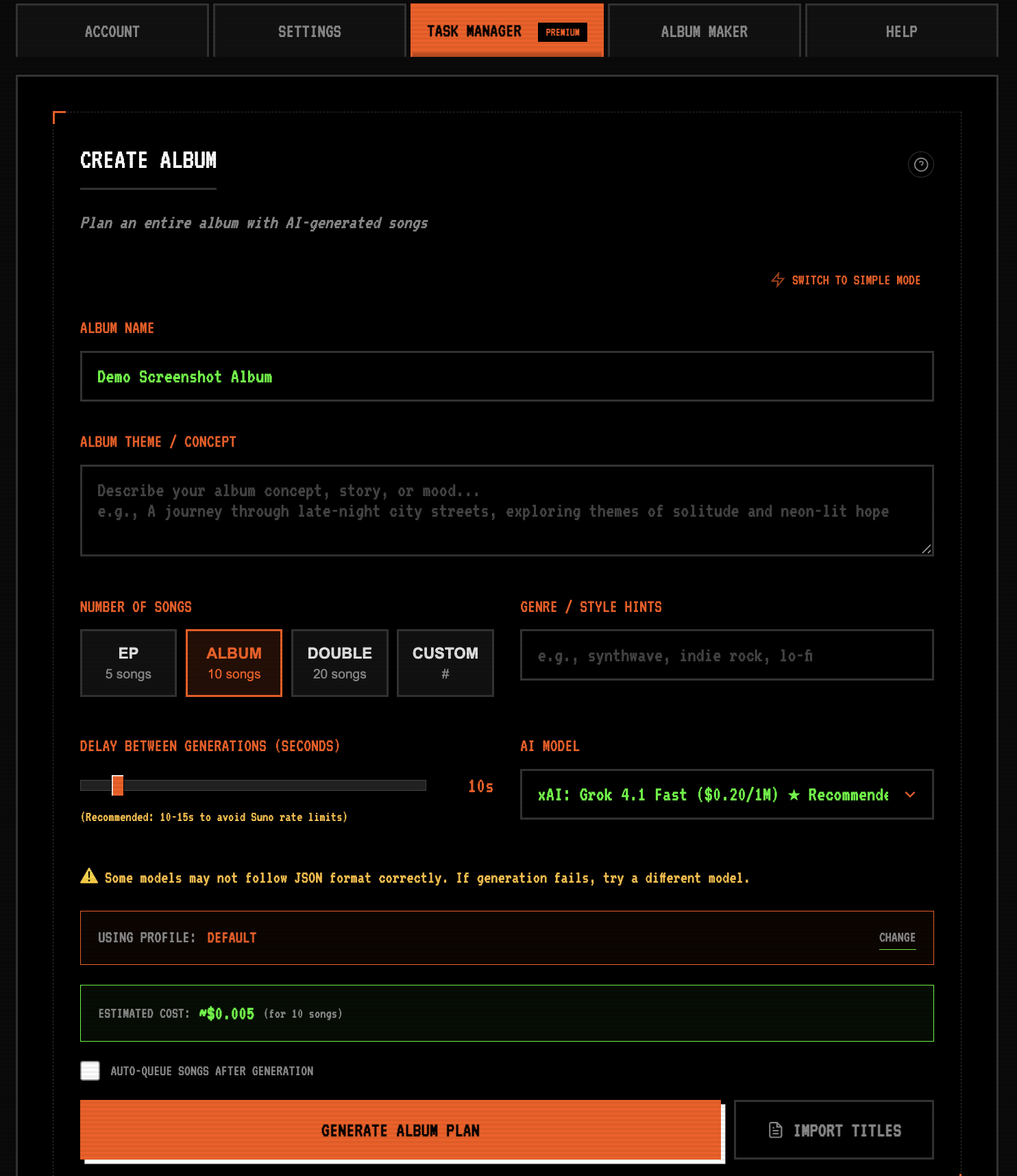
  2. Create Album: Enter album name, theme (e.g., "80s synthwave cyberpunk"), and genre
  3. Generate Plan: Click "Generate Album Plan" - AI creates 10+ song concepts with cohesive themes
  4. Review & Edit: Modify any song titles, regenerate concepts as needed
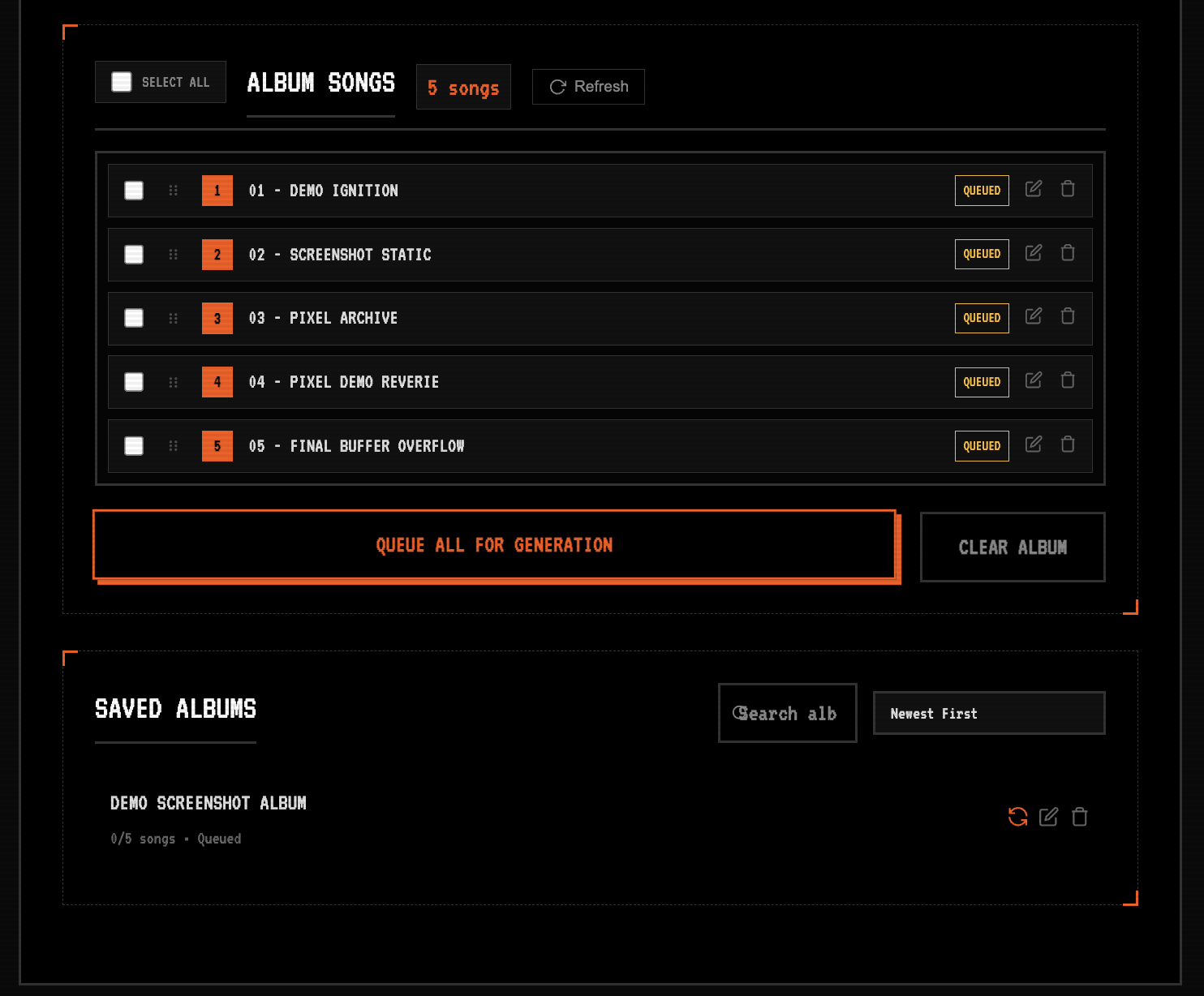
  5. Queue Album: Click "Start Generation" to begin Suno batch generation
  6. Hands-Free Creation: The extension fills Suno forms automatically, one song at a time
SongSmith Task Manager create album form

Create Album: Plan your album with AI

SongSmith Task Manager songs queued for generation

Queue songs for batch generation

> PRO TIP: Set delay between songs (30-60 seconds) to match Suno's generation time.

[WORKFLOW 3] ALBUM MAKER - POST-PRODUCTION

After generating songs on Suno, use Album Maker to create a professional release:

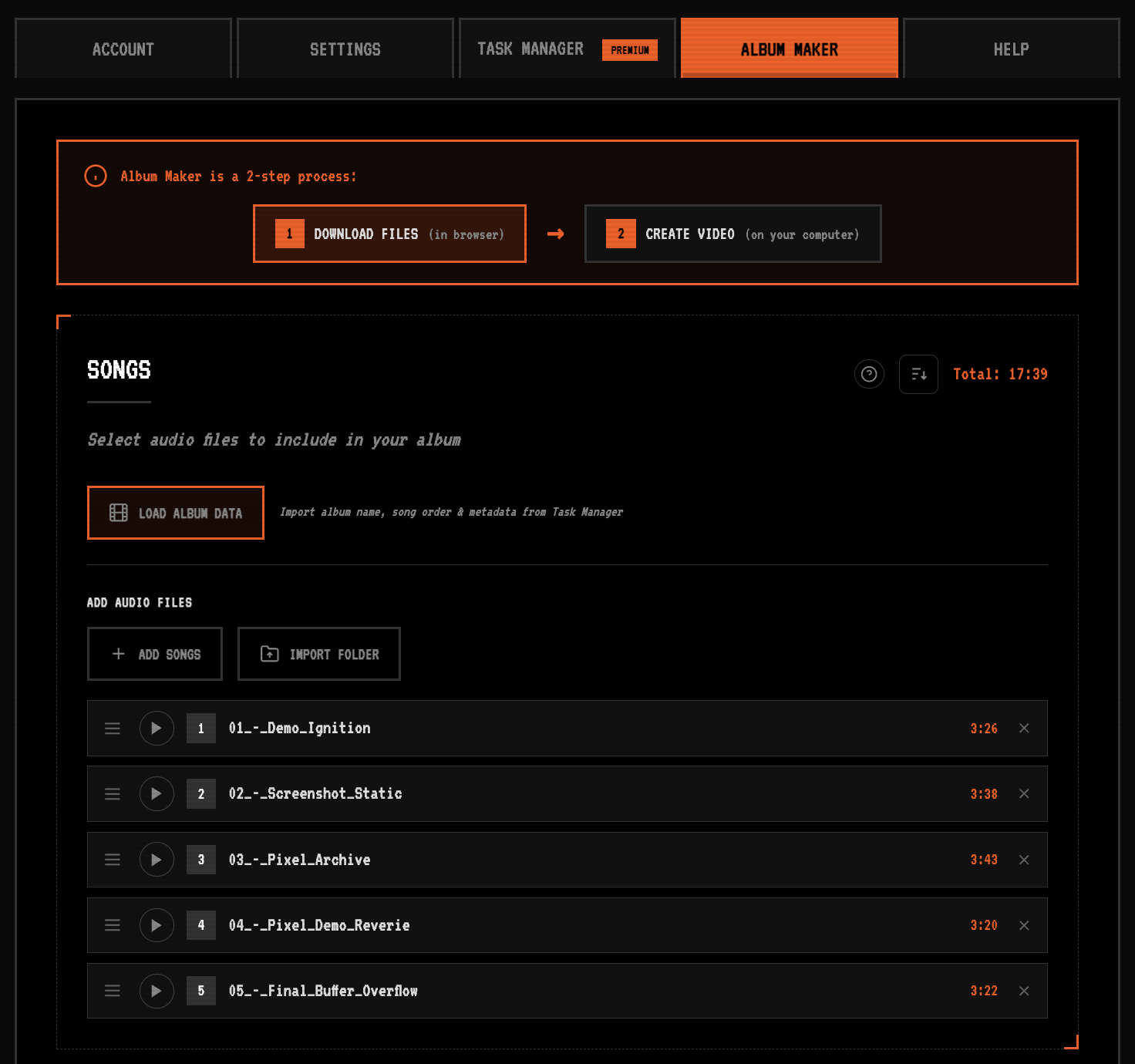
  1. Load Album Data: Import your album from Task Manager
  2. Add Audio Files: Import your downloaded MP3s from Suno
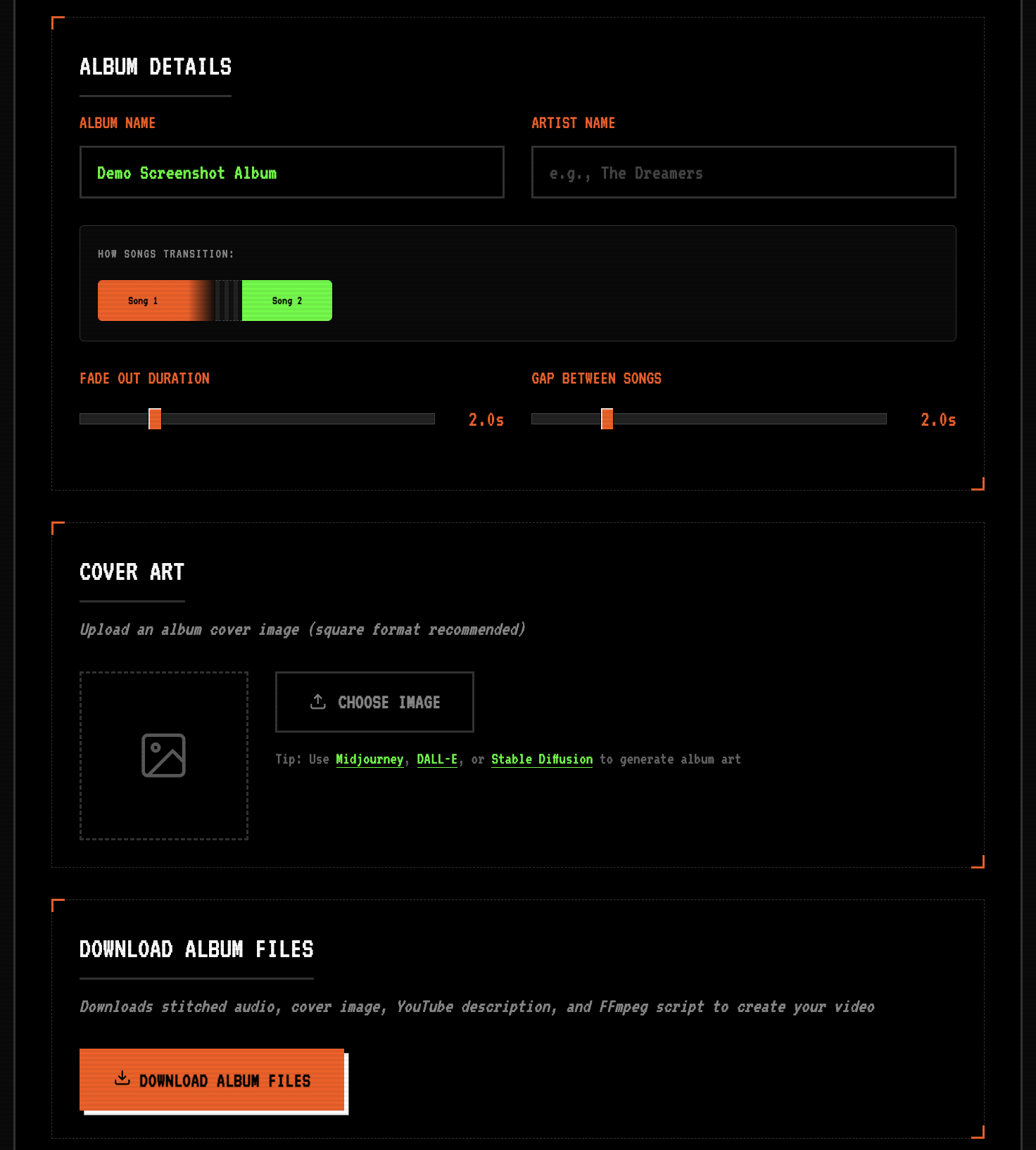
  3. Set Transitions: Configure fade duration and gap between tracks
  4. Add Cover Art: Upload or generate album artwork
  5. Download Package: Get stitched audio, cover, YouTube descriptions with timestamps, and video creation scripts
SongSmith Album Maker songs list

Import songs and arrange tracklist

SongSmith Album Maker album details and download

Configure details and download package

> PRO TIP: The YouTube description includes clickable timestamps for each track!

WHY SONGSMITH OVER THIRD-PARTY SUNO APIS?

SONGSMITH AI (FREE)

  • ✓ No per-song API costs
  • ✓ Use your existing Suno subscription
  • ✓ No rate limits beyond Suno's
  • ✓ Direct browser integration
  • ✓ Full album planning & stitching
  • ✓ AI-powered concept generation

THIRD-PARTY SUNO APIS

  • ✗ $0.05-0.15+ per song
  • ✗ Need separate API account
  • ✗ Strict rate limits
  • ✗ Server-side processing
  • ✗ Usually audio-only output
  • ✗ No concept generation

READY TO AUTOMATE YOUR SUNO WORKFLOW?

Join thousands of creators using SongSmith for Suno automation

DOWNLOAD_FOR_CHROME_